
15 practical ideas showing what to publish first, where to place each video, and how to improve trust.
If you are searching for simple videos small businesses can use, you probably already know video matters. The real issue is deciding what to make first, where it should sit on your site, and how to avoid spending weeks on videos that never help enquiries.
Most owners do not need a giant content plan. They need the right video in the right place, so a buyer can trust them faster. That is what this guide is for.
If you want broader context first, see video for small business and documentary production. For practical owner-focused planning, using video for business is also useful.

What People Mean When They Ask “What Videos Should I Put On My Website?”
Most people searching for practical ideas for simple videos small businesses can use on their website to get more sales. They are usually asking for two things at once, even if they do not say it directly. They want creative ideas they can actually picture on their business website, and they want clear direction on what to make first so they do not waste time or budget. That is usually the real tension. They need inspiration, but they also need a sensible order.
They are also trying to answer practical questions in their head, what video should i put on my homepage, what belongs on a sales page, what kind of proof helps someone trust us, and what can wait until later. If those decisions are unclear, everything feels heavier than it needs to. Content gets delayed, pages stay vague, and enquiries stay patchy.
That is why this guide to videos small businesses can use is practical. Not, do everything at once. Start with the page where buyers hesitate most, add one useful video with a clear job to do, then move to the next page.
A Better Way To Choose Videos, Page By Page
Homepage first. People land there with no context. Your homepage video should quickly answer who you help, what you do, and why your way of working is dependable. Keep it short and clear.
Then your main sales page. This is where many people stall, because they cannot picture the process. A process led video fixes that. Show how the work happens, what the buyer can expect, and what a good outcome looks like.
Next, add one outcome video. A short case study style piece is usually enough. You do not need an award film, you need a believable example of what changed for a real client. Specifics build trust.
Finally, your contact page. Most people ignore this one. A simple, what happens next video removes hesitation and makes forms feel less awkward. If you are wondering where to begin, these four pages are usually enough.
15 Videos Small Businesses Can Use without a huge budget
To keep this useful, here are 15 concrete ideas you can adapt quickly. You do not need all 15 now. Pick the three that match your current buyer friction.
1) Homepage trust intro video
A short homepage trust intro works best when it sounds like a normal person talking to another normal person. Think 30 to 60 seconds, who you help, what you solve, and why your approach is reliable. For example, a local heating engineer can quickly show clean installs, safety checks, and how handover works, which often reduces “just price” calls and increases enquiries from people who actually value good work.
This is one of the most practical videos small businesses can use because it answers first-impression doubt in under a minute. It also gives your homepage a stronger reason to keep people on the page rather than bouncing to competitors.
2) Owner – “why we do this” clip
This works especially well for owner-led businesses where trust in the person is part of the buying decision. A wedding photographer, private therapist, or consultancy owner can explain why they run the business, what standards they never compromise on, and what clients can expect from working together.
Done well, this is not an ego piece. It is a confidence piece. Buyers often want to know there is a real person with clear values behind the offer. That confidence can improve enquiry quality before any sales call happens. For more on this format, see our company story video guide.

3) Quick “who this is for” explainer
Many small businesses waste time on poor-fit leads. A short explainer can fix this by stating who you help best and where you are not the right fit. For instance, a bookkeeping firm can say they are ideal for service businesses under 25 staff and not built for enterprise payroll complexity.
That clarity can feel risky, but it usually improves conversion. Better-fit visitors feel seen, while poor-fit visitors self-select out earlier. This is one of the best videos for a business website when lead quality is the main pain point.
4) Process walkthrough for a key sales page
If people ask the same “how does this work?” questions repeatedly, this is usually your first high-impact asset. A landscaping company can walk through survey, design, build stages, and aftercare in one clear sequence. A legal service can show intake, review, timeline, and communication points.
This directly supports videos to add to a sales page because it removes uncertainty at decision stage. Buyers are not only buying the result, they are buying the experience of getting there.
5) “What you get” scope explainer
Use this when enquiries are vague or quote conversations drag. A web design studio can explain what is included, number of pages, revision structure, launch support, and what is out of scope. A cleaning service can explain visit frequency, task lists, and add-ons clearly.
Clarity here protects both sides. Buyers feel safer because the offer is concrete. You waste less time because expectations are cleaner from the start.
6) Common mistakes buyers make
This is a trust-builder that positions you as helpful before the sale. A gym owner can explain why people fail by chasing intensity before consistency. A marketing freelancer can explain why ad spend fails when landing pages are weak.
When you teach clearly, buyers assume you can deliver clearly. This often improves both trust and perceived expertise without sounding pushy.
7) What a good project looks like
Show buyers what “good” means in your world. A building contractor can show clean handover, snag-free finish, and timeline discipline. A software agency can show a clean kickoff, weekly updates, and smooth deployment.
This reframes the conversation away from cheapest price to best-fit expectations. It also gives prospects language they can use internally when choosing between suppliers.
8) Mini case study, before and after
Keep this tight and specific. A dentist can show patient confidence outcomes from a treatment pathway. A logistics firm can show delivery error reduction after process changes. One clear before, one clear after, one clear lesson.
This is what video content helps people buy when proof is needed quickly. Real outcomes remove doubt faster than broad claims. If you want a deeper framework, see our case study video production page.
9) Customer Q&A clip
Instead of scripted testimonials, ask clients practical questions, what problem they had, what changed, what surprised them, and what advice they’d give someone choosing now. A property service, childcare provider, or B2B consultant can all use this format well.

Q&A clips feel more believable because they sound conversational. Buyers hear the same concerns they have, answered in real language.
10) Team standards clip
If your quality comes from team behaviour, show it. A catering company can show prep standards and allergen controls. A care provider can show safeguarding routines and communication approach. A trades team can show tidy-site discipline and final checks.
This builds trust through detail. Buyers often assume quality from what they can see repeatedly, not from one bold promise.
11) Behind-the-scenes quality checks
A behind-the-scenes clip works best when it shows quiet competence. For example, an e-commerce brand can show packing accuracy checks. A videographer can show backup workflow and handover QA. A cleaning firm can show room-by-room sign-off process.
If you are unsure where to place videos on a website, these clips often work well mid-page on sales pages where buyers compare reliability. We break this down further in our behind the scenes video production guide.
12) Company story video
This is useful when trust in the people is a major buying factor. A family business with decades of local reputation, or a specialist owner with deep industry background, can use a company story to make values and standards visible.
Keep it grounded, why you started, how you work now, and what clients can rely on. Avoid hype. Buyers trust specifics. For examples, visit our company story video page.
13) What happens after enquiry video
This is one of the most underused ideas. A 45-second contact-page video can explain response times, what info helps, and what the first call looks like. For anxious buyers, this removes fear and increases form completion.
It also saves you admin time because enquiries arrive with better context. Clear expectations improve both sides of the conversation. If useful, read our guide to using video for business next.
14) Pricing approach explainer (without hard quotes)
You do not have to publish exact prices to be transparent. You can explain what affects price, scope, timeline, complexity, and support. A design studio, contractor, or consultant can all use this to reduce “price shock” reactions.
This often improves lead quality because buyers arrive with better expectations instead of guessing. For more detail, see our small business video marketing strategy guide.
15) “How to prepare before we start” clip
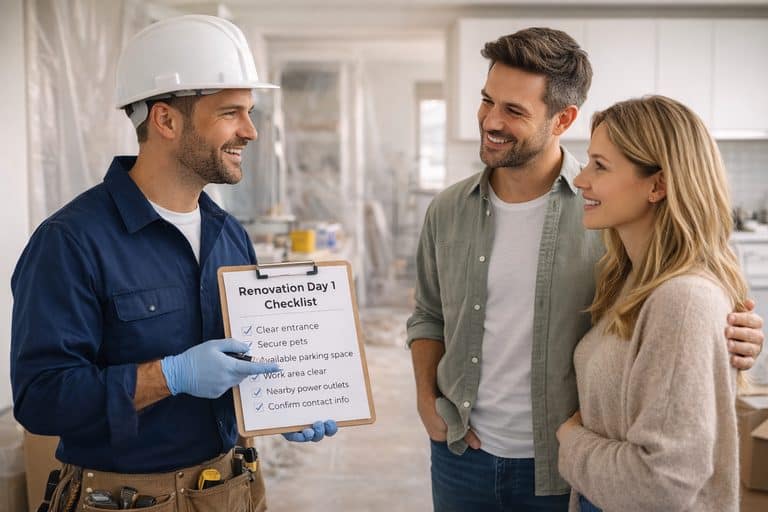
Great for onboarding and smoother delivery. A bookkeeping firm can show clients exactly what to send and how to prep it. A clinic can walk people through appointment prep so the visit runs cleaner. A renovation company can explain access, parking, pets, what needs clearing, and what to expect on day one. Small things, but they reduce delays, cut awkward back and forth, and make the whole experience feel calmer from the start.
It also signals something important, that you run your business with structure. That quiet competence is what higher trust enquiries are often looking for, even if they don’t say it out loud.
And that’s the real point. When video is matched to clear page intent, it helps people buy into how you work, not just what you sell.
A 30-Day Plan You Can Actually Follow
Week 1, publish a homepage trust video. Week 2, add one process video to your key sales page. Week 3, publish one proof video. Week 4, add a contact page reassurance video. That is enough to test what works before producing more.
Measure the quality of questions, the clarity of briefs, and whether enquiries are a better fit. If those improve, your video placement is working. If not, fix the messaging before adding more videos.
Three Real Scenarios, And The First Video To Add
A local trade business gets lots of, how much, messages and low quality calls. First video to add, a process walkthrough on the main sales page. This filters low intent leads and builds trust with better fit buyers.
A B2B firm gets long sales calls but slow decisions. First video to add, one outcome led case study video. Decision makers need a clear proof story they can repeat internally.
An owner led service brand gets attention but weak conversion. First video to add, a short company story video. People often need confidence in the person behind the offer before they commit.
FAQs for videos small businesses can use
Start with one homepage trust video, one sales-page process video, and one proof video. That usually gives the fastest improvement in enquiry quality.
Use a short trust intro video. Keep it under one minute and answer who you help, what you do, and why people can rely on you. Testimonial videos can support this on nearby sections.
Place videos near decision points, homepage near main CTA, sales pages near process and proof sections, and contact page near form instructions.
Contents
- 1 What People Mean When They Ask “What Videos Should I Put On My Website?”
- 2 A Better Way To Choose Videos, Page By Page
- 3 15 Videos Small Businesses Can Use without a huge budget
- 3.1 1) Homepage trust intro video
- 3.2 2) Owner – “why we do this” clip
- 3.3 3) Quick “who this is for” explainer
- 3.4 4) Process walkthrough for a key sales page
- 3.5 5) “What you get” scope explainer
- 3.6 6) Common mistakes buyers make
- 3.7 7) What a good project looks like
- 3.8 8) Mini case study, before and after
- 3.9 9) Customer Q&A clip
- 3.10 10) Team standards clip
- 3.11 11) Behind-the-scenes quality checks
- 3.12 12) Company story video
- 3.13 13) What happens after enquiry video
- 3.14 14) Pricing approach explainer (without hard quotes)
- 3.15 15) “How to prepare before we start” clip
- 4 A 30-Day Plan You Can Actually Follow
- 5 Three Real Scenarios, And The First Video To Add
- 6 FAQs for videos small businesses can use
- 7 Next Step