
See the scene. Plan the coverage. Arrive ready to shoot.
You can see the scene clearly in your head. The harder part is showing your cast and crew where everyone should be, what each camera will cover and how the lighting will help tell the story.
FramePlan is simple shot planning software for independent filmmakers who want to work those decisions out before the equipment comes out of its cases. Build a top down plan, arrange the action and explore your shots while changes are still quick, easy and free.
Whether you are planning a short film, interview, commercial or feature, this shot planning software gives you space to test ideas before time and practical pressures take over. If you are planning a commercial production for your own business, you can also explore our video production for small business services.
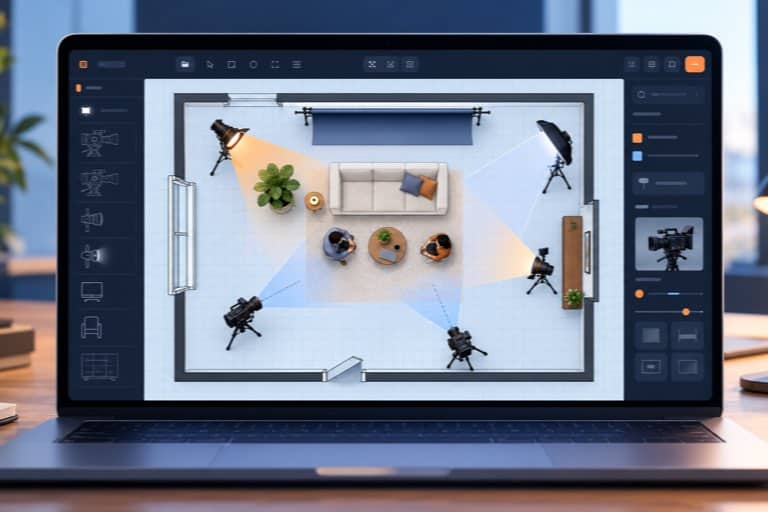
Turn the picture in your head into a plan everyone can follow
A great deal of shooting time can disappear while people discuss positions, move equipment and try to understand a hurried sketch. FramePlan helps you make those decisions earlier. You can show the director of photography, camera team, lighting crew and performers what you are trying to achieve, then refine the plan together before the shoot begins.
Use FramePlan to:
- Create and organise complete scenes, with multiple individually named and numbered shots
- Arrange actors and experiment with blocking before asking performers to wait on set
- Position cameras, adjust their direction and explore approximate lens lengths and fields of view
- Place different lights and adjust their horizontal beam angles to visualise the lighting plan
- Plan wide shots, close coverage and cutaways while keeping an eye on the 180 degree line
- Build the space with doors, windows, furniture, props, backdrops and production equipment
- Fine tune positions with the keyboard arrow keys when a small adjustment matters
- Try alternatives freely, with undo available when an idea does not work as expected
- Print every shot in a scene or save the complete scene plan as a PDF for the crew
- Continue planning without an internet connection once FramePlan has been activated
Shot planning software without the unnecessary complexity
Some production platforms are designed to manage entire studios. They can be powerful, but they can also be expensive, time consuming to learn and far more complicated than a small production needs. FramePlan takes a different approach. It concentrates on the practical job of planning what will be in the scene, where the cameras will go and how each shot will work.
There is no software to install and no complicated production management system to master. FramePlan runs as a standalone HTML file in a modern browser on Windows, macOS or Linux. Open it, start arranging the scene and let the plan develop visually.
Explore the scene before the pressure begins
A location rarely gives you unlimited time. The cast may only be available for a few hours, daylight changes, equipment has to be moved and every new setup eats into the schedule. FramePlan lets you consider the difficult questions while you still have room to think.
Before the shoot, you can explore:
- Whether your planned coverage will give the editor enough choice to build the scene
- How the actors, cameras and lights relate to one another as the action develops
- Which shots are essential and which alternatives you may want if time allows
- How to explain the plan clearly when the cast and crew arrive on location
Secure payment is handled by Stripe.
Made for the way independent filmmakers actually work
FramePlan was created by KindFame Productions for filmmakers working with real limits on time, crew and budget. It is useful when one person is wearing several hats, when the crew cannot attend a lengthy technical recce or when the director needs a clearer way to share an idea than waving towards a corner of the room and saying, ‘the camera will probably go over there’. A visual plan gives everyone a common starting point.
Use it to plan a short film one scene at a time, develop coverage for a feature, work out an interview setup for a documentary production, prepare a small commercial production or teach camera placement and screen direction in a filmmaking group. The plan does not lock you in. Things will still change when you reach the location, as they often should, but you will be adapting a considered plan rather than starting from nothing.
From first idea to practical shooting plan
- Create the scene and give each planned shot a clear name and number.
- Lay out the location using walls, doors, windows, furniture and the objects that matter.
- Position the actors, cameras and lights, then adjust angles and fields of view.
- Duplicate or refine the setup to explore the next shot and build your coverage.
- Print the complete scene or save it as a PDF so the plan can travel with the production.
Frequently asked questions
No. FramePlan costs £9.99 as a one-off payment. There are no recurring subscription charges.
Yes. You will need an internet connection for the initial activation. After that, FramePlan can be used offline.
FramePlan runs as a standalone HTML application in a modern web browser on Windows, macOS and Linux. Nothing needs to be installed.
No. The displayed camera angles and estimated lens lengths are planning aids. They are approximate and should not replace on-set lens and camera tests.
Yes. A project can contain up to 100 scenes, with multiple individually named and numbered shots in each scene.
Yes. You can print or save all the shots from a scene as a PDF.
Your licence is intended for your own use. If you need to use FramePlan on several computers or have difficulty activating it, please contact KindFame Productions.
Ready to plan your next shoot?
Choose FramePlan on its own, or include the Shot List add-on and save £1.99. Both are one-off purchases with no subscription.
FramePlan lifetime licence
One payment of £9.99. Your licence is linked to your verified KindFame account.
Payment is processed securely by Stripe.
FramePlan with Shot List
One payment of £15.99 for FramePlan with the Shot List add-on included.
Payment is processed securely by Stripe.